
Data export & delivery management
Data every team can work with, without copying it row by row
The shirt supplier wants counts by size, the packing team wants addresses, accounting wants the money as at an agreed date, and they all ask at roughly the same time.
If entries can only be viewed on screen, someone copies them row by row, which is slow and error-prone. One wrong address or shirt size means a pack at the wrong house or a shirt that does not fit. And with everyone copying at different times, no two files in the group agree.
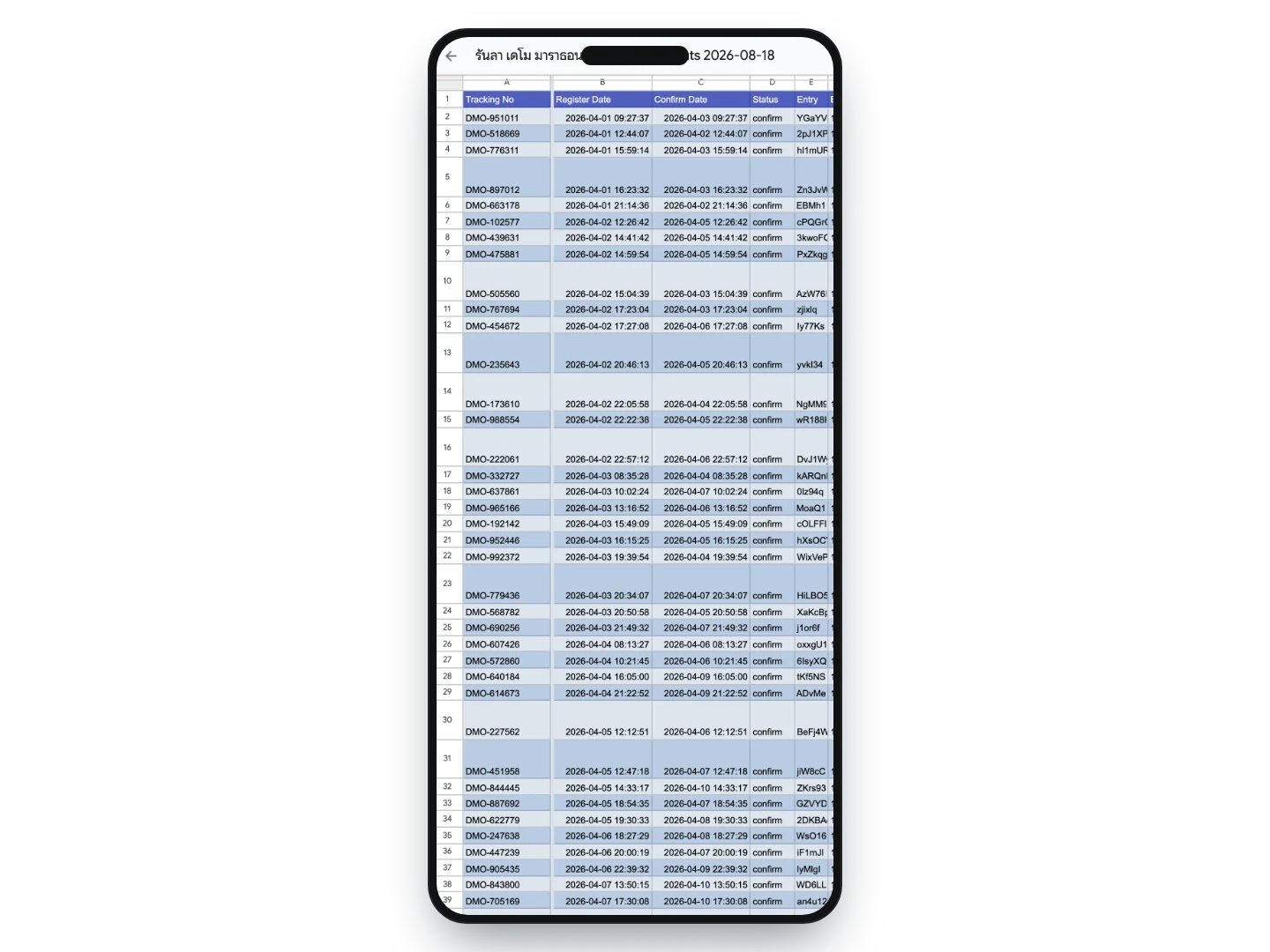
Each dataset comes out as a Google Sheet that opens on a phone, cut at the moment you download it and dated in the file name, so everyone knows which day they are working from.
What this service does for you
- 1
Every dataset each team needs, in one place
The participant list drives shirt production orders and the medical team’s roster; the sales report closes the books with accounting and partners, with a cut-off date you choose; the delivery file drives packing and shipping labels; deferrals and refund requests sit in their own file. All of them are downloaded from the same place.

- 2
Opens on a phone as readily as on a desktop
What you get is a Google Sheet that opens straight from a link — no software to install and no Google account needed. Standing at the printers and need to check shirt sizes? Open it on your phone.
- 3
Teams who live in Excel carry on as they are
The sheet has Google Sheets’ own download menu, so you can take it away as Microsoft Excel (.xlsx), CSV or PDF. Nobody has to change how they work.
How organizers use it
Order shirts against real numbers, not an estimate
Shirt sizes and any other options runners chose at entry come through as their own columns — per person for the supplier, and ready to total inside the sheet. If all you want is a quick count per size, the entrant statistics page already charts it by option.
Hand the packing team what they need without system access
The delivery file carries the recipient name, phone number, full address, bib number and everyone on that entry in a single row. Send the link to your packing team or courier and they can work from it immediately, with no user accounts to create.
Close the books with partners as at an agreed date
The sales report takes a cut-off date. The first sheet totals the number of runners, entry fees and add-ons, and what remains after discounts and delivery charges, with breakdowns by distance, payment method and promotion in the same file.
Produce the roster for the medical team and insurers
The participant file already includes date of birth, age, ID number, medical conditions, blood type and emergency contacts. Cut the columns you do not need and you have the list for the medical team or the insurer in a few minutes.
Supply figures for permits and approvals
Headcount by distance and age group, as required when applying to use a route or a venue, comes out of the same file — nobody has to count anything again.
Keep everyone referring to the same file
Each download is a fresh file cut at that moment, with the date in its name. Conversations can then be anchored to a particular day’s file, rather than to something forwarded so many times its origin is unclear.
What you can set
- Datasets available
- Participant list · sales report · delivery addresses · deferrals and refund requests (discount codes and results are downloaded from their own pages)
- Format
- A Google Sheet opened by link on phone or desktop, with Excel (.xlsx), CSV and PDF download available from the sheet’s own menu
- Sheet layout of the participant file
- One sheet per distance, or every distance combined into a single sheet — your choice
- Standard columns
- Entry number, entry date, confirmation date, status, bib, distance, age group, team, name in Thai and English, gender, date of birth, age, ID number, club, nationality, address, email, phone, photo, medical conditions, blood type, emergency contact and the amount on the entry
- Event-specific columns
- Every question and add-on configured on your event becomes its own column — shirt size, collection method, start block and so on
- Sales report
- Choose the cut-off date; you get a summary sheet with breakdowns by distance, payment method and promotion, followed by the raw data behind each section
- Delivery file
- Available on events with delivery enabled, covering only entries that chose delivery, alongside the options you set to appear in the report, such as shirt size
- Scope of the participant file
- Confirmed entries only; cancelled and refunded entries are in the separate deferral and refund file
- Access
- Downloads are limited to people with rights on that event, and the fee figures in the sales report are visible only to those granted access to financial data
- Cost
- None — it is part of the registration service
Frequently asked questions
Why a Google Sheet rather than an Excel file?
Because a link opens anywhere with nothing installed — on the packing team’s phones and on accounting’s desktop — and it can be passed to someone outside the team without emailing a file around. If you prefer Excel, the sheet’s File → Download → Microsoft Excel (.xlsx) menu is always there.
Is a Google account required?
No. Anyone with the link can open and read it. To keep it permanently or edit it in place, sign in with your own Google account and make a copy, or download it to your machine.
How long does the link stay live?
It is temporary — the system deletes generated files automatically so runner data is not left sitting on old links. If you need to keep it, take a copy or download it when you first open it; you can generate a fresh one as often as you like.
Can we forward the link in a LINE group?
You can send it to the people who need it, but be aware that anyone holding the link can read it without signing in, and the file contains runners’ personal data in full, including phone numbers and addresses. It should not be posted publicly or in an open group.
Does the file stay in sync with the system?
No. It is a snapshot from the moment it was created, which is why the date is in the file name. Generate a new one whenever you need current figures — there is no charge.
If we edit the sheet, does it write back to the system?
It does not. These files are for taking data out, so entrant details must be changed in the system itself — the exception being files designed to be uploaded back, such as bib assignment, which has its own upload step.
Can runners see their tracking numbers once packs are shipped?
Yes. Send us a file pairing tracking numbers with entry numbers and we upload it, after which each runner sees their tracking number on their own entry and can open the courier’s tracking page from there. We handle the upload because it writes back to a large number of entries at once.
If we only need the totals per shirt size, do we have to count them in the sheet?
No. The entrant statistics page in the system already charts responses by add-on, so the count per size is there to look at. The downloadable files are more useful when you need the per-person list for a supplier or a packing team.
Related services
Online registration
Our team reviews your details and configures the whole registration — distances, price tiers, caps, solo and team entries, event-specific questions — before you go on sale, and one set of entrant data carries all the way through to race day.
Add-ons & event-specific questions
Ask any question your event needs, from shirt size to delivery address, and sell extra shirts, accommodation or shuttle seats with their own prices and stock caps — all paid for in one go with the entry fee.
Daily summary by email
Every morning we email you a summary of entries and fees for your event, broken down by status and by distance — so you can follow how it is going daily without logging in.