
Daily summary by email
Know how the event is doing every morning, without opening the system
Most organizers have a day job or several events at once, so checking entries every day turns into once a week, or whenever it comes to mind.
Yet nearly every decision hangs on entry numbers: when to run a promotion, when to close a full distance, how many shirts to order. Finding out two weeks late leaves fewer options. Ask the team what the number is today and the answers rarely match, because everyone looked on a different day.
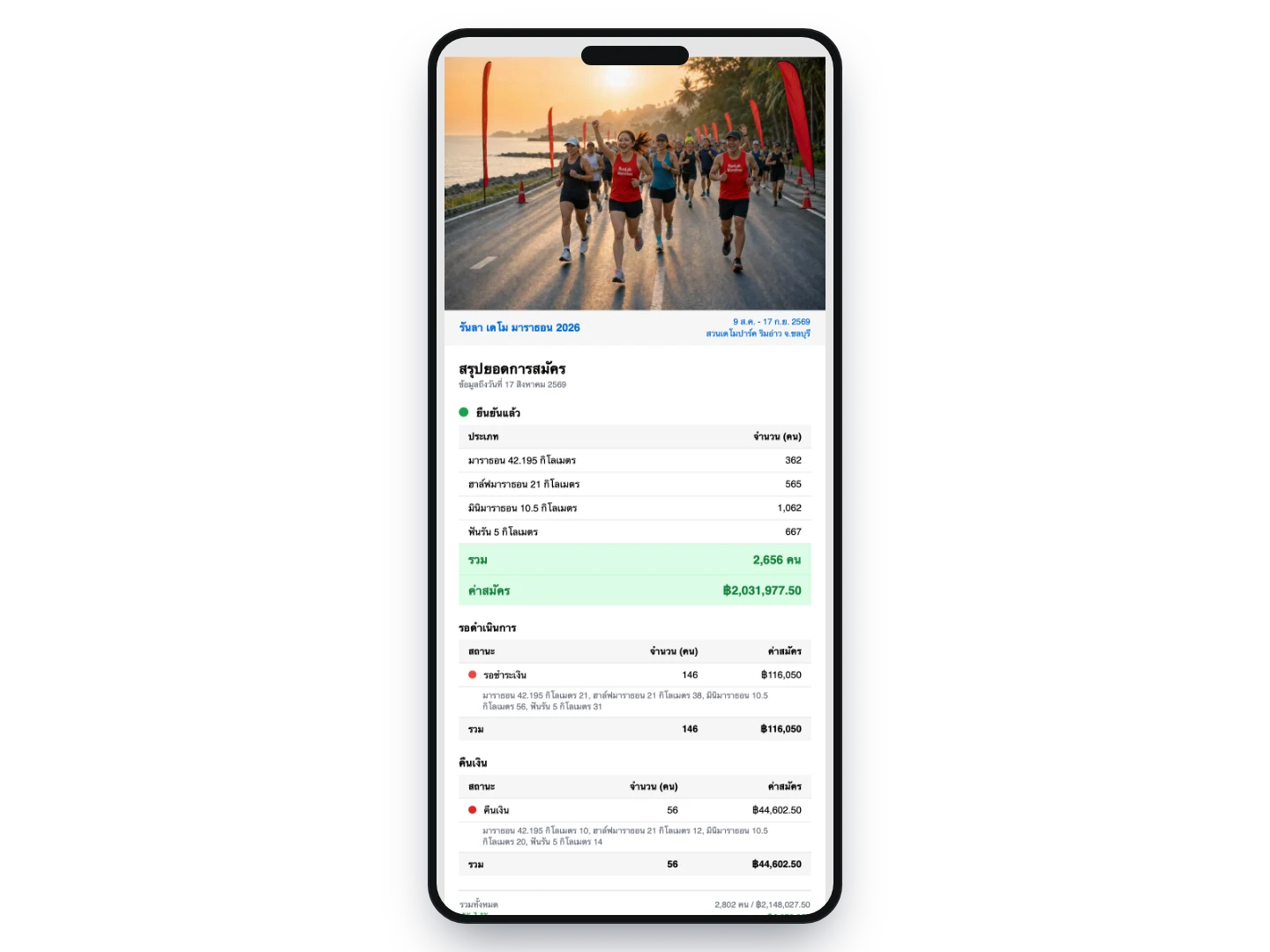
Every morning we email a summary of the day before to everyone you named, so the whole team starts from the same figures without anyone logging in.
What this service does for you
- 1
Decide who on the team should see the numbers
Send us the email addresses that should receive it — the owner, finance, whoever handles marketing. Several people per event is fine, and everyone gets the same edition at the same time.
- 2
It arrives every morning on its own
Yesterday’s summary lands before dawn and reads straight off a phone. No logging in, no remembering which page to open, and no waiting for someone to compile it.
- 3
From the headline figure down to each distance
The email carries confirmed entries, payments still pending and refunds, split by number of people and by amount, together with a per-distance breakdown of where each one stands. If you want more detail, the button at the bottom opens the dashboard.
How organizers use it
See what a promotion did within a day
Release a code or announce the final price tier, and the next morning shows exactly how much entries moved — instead of waiting for a week-end summary and guessing which action worked.
Catch the moment entries flatten out
The middle of the sale period is usually flat. Seeing the number daily tells you how many days it has been flat, which is the signal that it is time to act — not something to discover with two weeks left.
Order stock against real numbers
A daily count per distance makes it easier to decide how many shirts and medals to order, and how many more days to wait before locking the quantity, rather than over-ordering to be safe and writing off the rest.
Put the whole team on the same number
The owner, finance and marketing all receive the same email at the same time, so a meeting starts from one set of figures instead of three remembered from three different days.
A daily record you did not have to keep
The emails piling up in your inbox become the event’s daily log. You can look back at the day entries jumped and line it up with what you did that day.
What you can set
- Frequency
- Daily, sent before dawn, covering everything up to the end of the previous day
- Recipients
- Several per event; tell the team any time to add or remove someone
- Confirmed entries
- People and fees, broken down by distance so you can see where each one stands
- Pending
- Split into awaiting verification, awaiting payment and unpaid, with amounts
- Refunds
- Shown when there are any, alongside the net amount due to the organizer
- Shortcut
- A button at the end opens the event dashboard directly
- When it is sent
- Only for events that have not yet taken place and already have entries; it stops by itself once the event is over
- Cost
- None — it is part of the registration service
Frequently asked questions
How do we add or change a recipient?
Tell the team any time and we will set it the same day. This is handled on our side because it sends mail out in the system’s name, so it is not editable from the event dashboard yet.
Can we stop receiving it daily?
Ask to be taken off at any point, and once an event is past its date the system stops sending without you having to do anything.
Does it compare against the previous day?
Not yet — the email reports the running totals as at that day, without calculating the change from yesterday. If you want to see the trend as a graph, the entrant statistics page in the system already plots daily entries.
Do the numbers match what is in the system?
Yes, they come from the same entries. The only difference is the cut-off: the email counts to the end of the previous day, while the site shows the position at the moment you open it.
Why did no email arrive some days?
Two cases: there were no entries yet, or the event date has passed. Beyond that, if you use a corporate mailbox with filtering, check the junk folder and allow our sender address.
Related services
Online registration
Our team reviews your details and configures the whole registration — distances, price tiers, caps, solo and team entries, event-specific questions — before you go on sale, and one set of entrant data carries all the way through to race day.
Race statistics & analysis
Who actually ran, who did not turn up, when finishers arrived in the biggest numbers, and how long each distance took — read straight off your own race results, with nobody having to build a summary file.
Data export & delivery management
Pull entrant lists, sales figures and delivery addresses out as a Google Sheet that opens on a phone or a computer, and download it as an Excel file whenever you need to.