
Add-ons & event-specific questions
Ask for what you will actually use, and sell extras on the same entry
Shirt size, pack collection, delivery address, emergency contact: anything you do not ask at entry has to be chased later over chat or email, and it never comes back from everyone.
Extras like a second shirt, a hotel or a shuttle seat, paid separately from the entry, become another pile of slips to match to people. When it is time to order shirts or book buses, the count per size and per departure comes from a guess or a spreadsheet typed up twice.
When our team sets the questions and extras into the entry form before sales open, you get the answers at entry, the money in the same total as the fee, and counts per size you can order against straight away.
What this service does for you
- 1
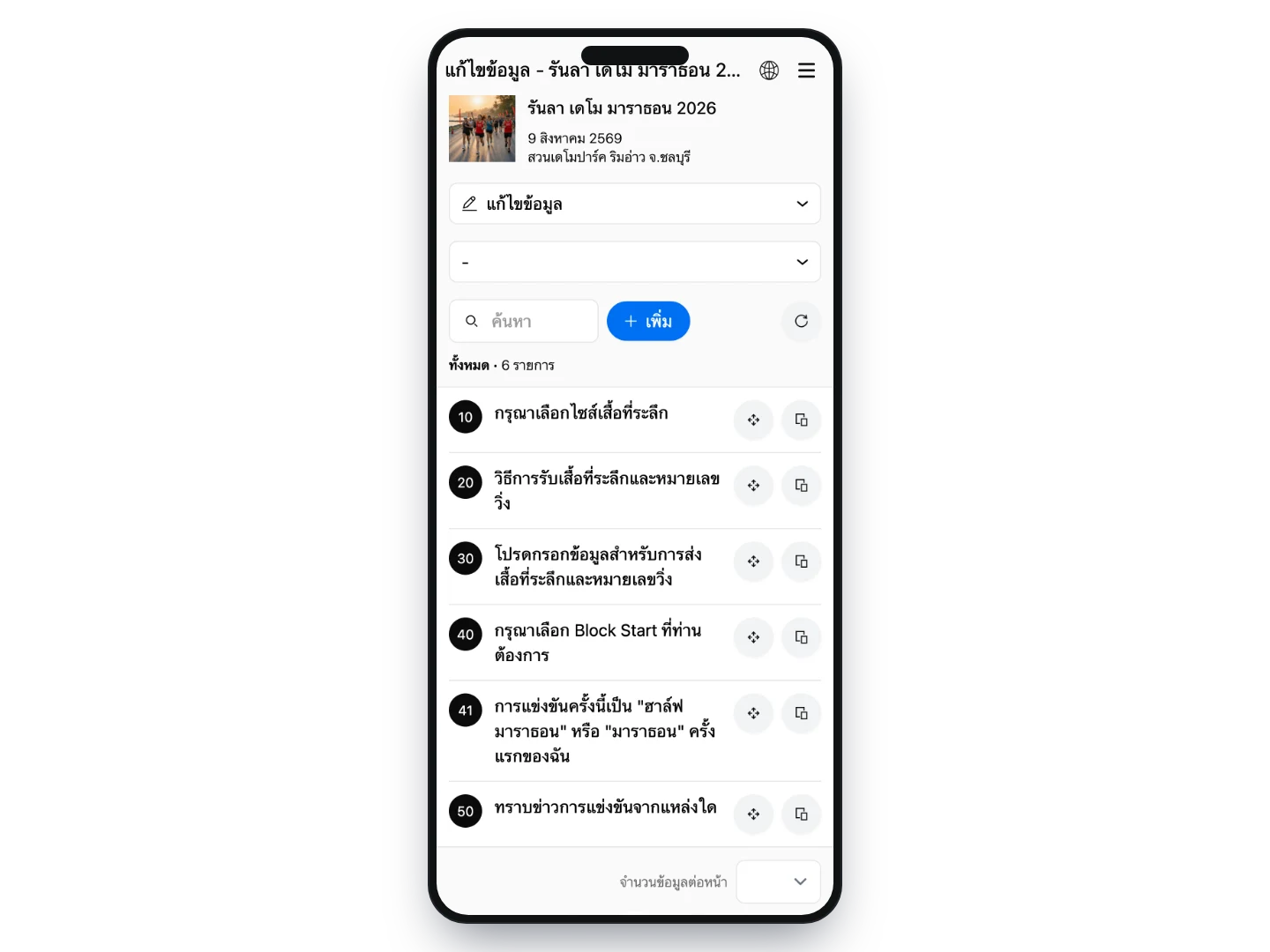
Tell us what you need to ask and what you want to sell
Send the list of questions and extras and we configure the whole set: which are required, which apply to particular distances only, and the price and stock cap on each item.
- 2
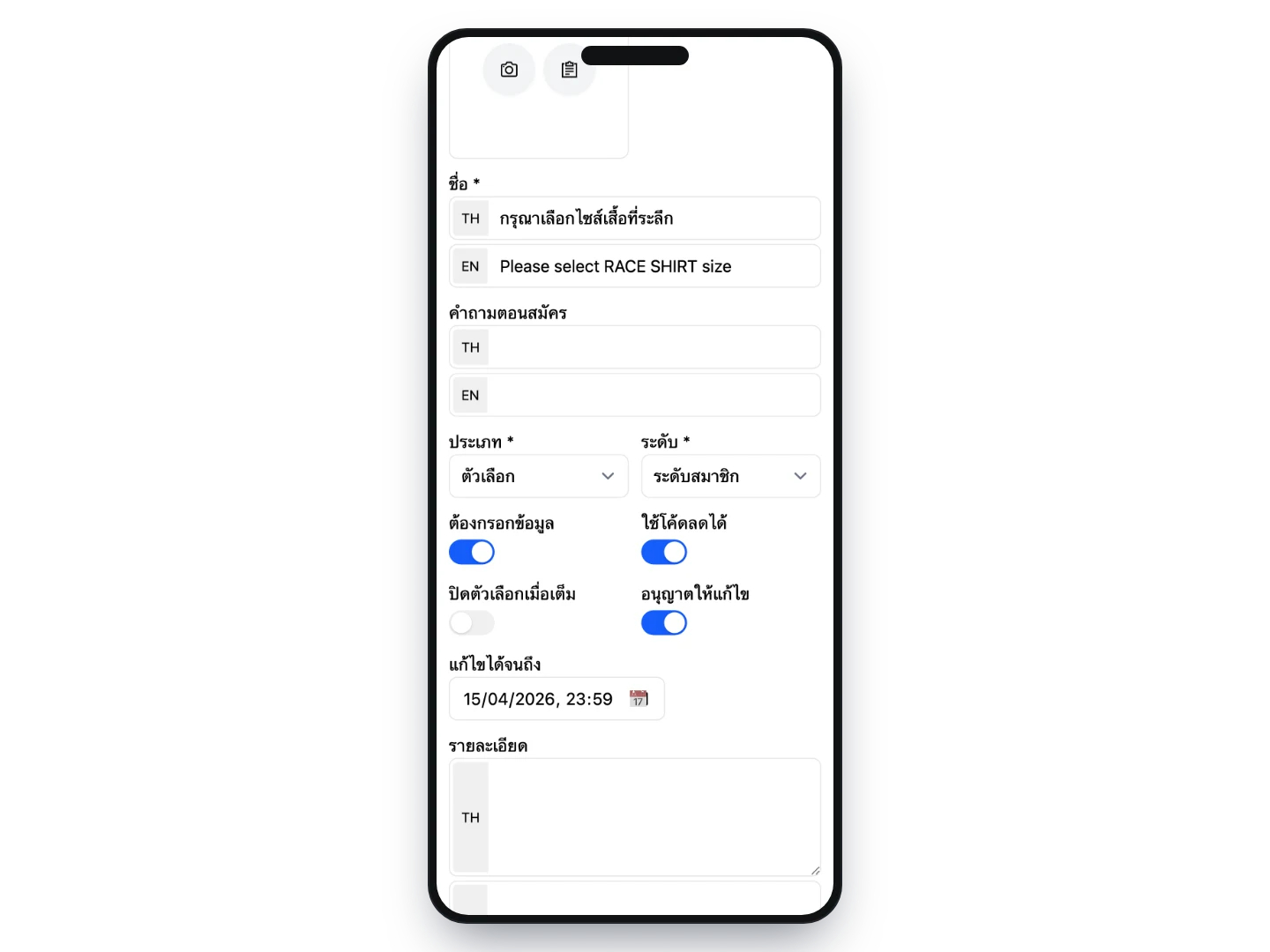
Conditions are set so the system runs itself
Each option has its own stock cap and can close automatically when it sells out, questions can be limited to the distances they concern, and you decide the date until which runners can go back and change their answers. After that the system locks them, so the numbers you order against stop moving.
- 3
Runners choose while entering, and pay once
Anything with a price is added to the same total as the entry fee — no separate transfer, no second set of slips to chase. One entry holds the fee, the extras and every answer together.
- 4
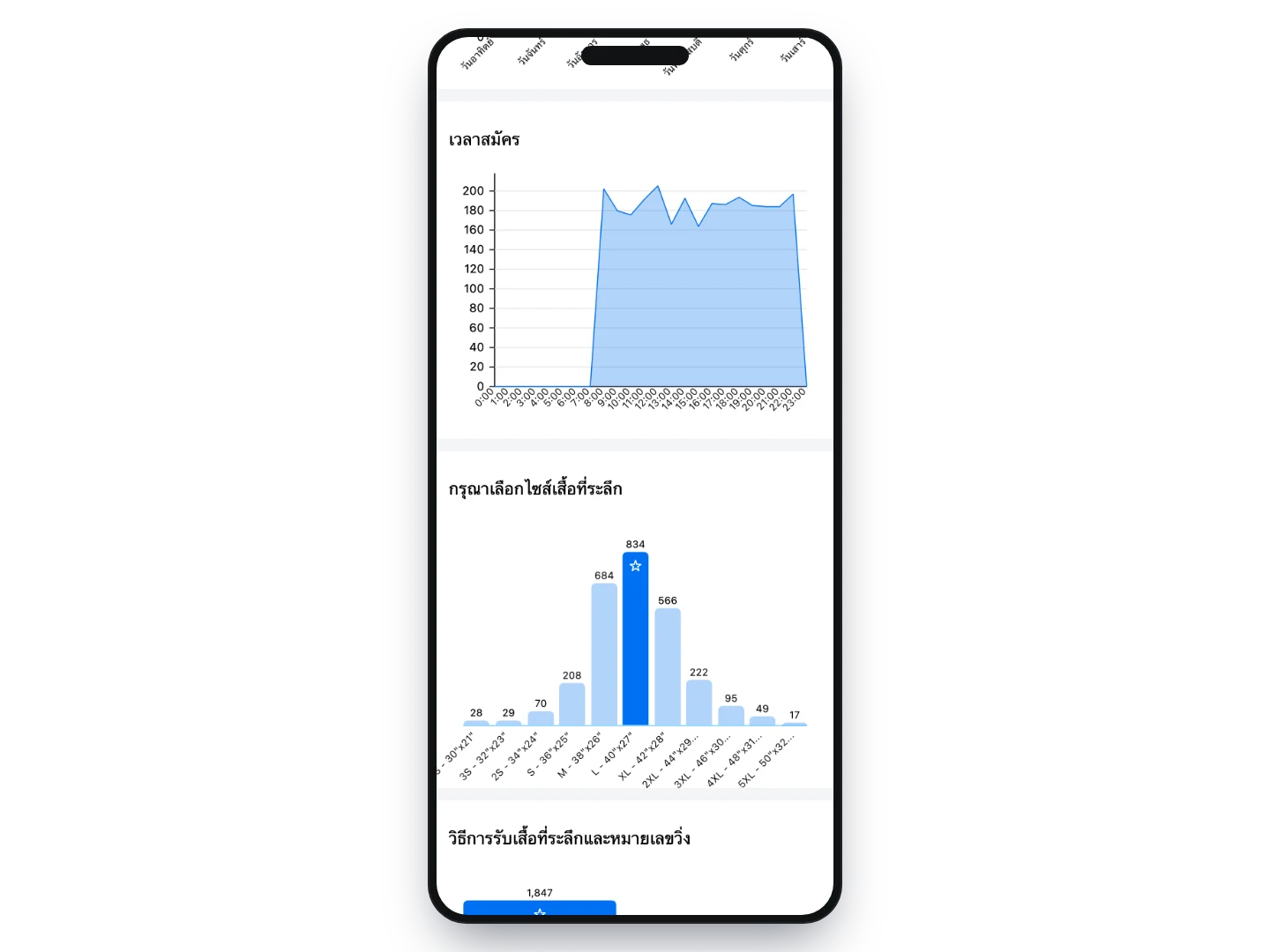
Totals per answer, ready to order against
The statistics page totals it for you: how many of each shirt size, how many collecting in person, how many posted, and how much of each extra sold. These come from the actual entries, so you can order stock and plan logistics without adding anything up yourself.
How organizers use it
Shirt sizes with a cap per size
Set each size as an option with its own stock cap. A size that runs out closes itself and can no longer be chosen — instead of being accepted anyway and turning into change requests later, which are hard to unwind and usually end with ordering more shirts.
Sell extra shirts or souvenirs
Add them as priced items. Runners pick them while entering and pay in one total, so you get the extra revenue and the production quantities in the same place, without opening a separate online shop.
Accommodation and shuttle buses
For races out of town with a hotel deal or a shuttle from a meeting point, set them up as priced options with a limited number of seats. When the time comes you know how much to actually book, instead of over-booking to be safe.
Collect in person or have it posted
Ask how the pack will be collected first, and show the address fields only to those who choose delivery. People collecting in person are not made to fill in a form that does not apply to them, and the delivery details you get are complete enough to print labels from.
Receipt and tax invoice details
Runners claiming the entry back from their employer can provide the billing details while entering, so your team is not chasing them afterwards — a request that usually goes unanswered.
The details that matter when something goes wrong
Emergency contact, blood type, existing conditions — required on the long distances only, if that is what you want. It lives on the same entry the medical team can pull up on the day, not in a file on somebody’s laptop.
Start blocks based on expected finish time
Ask for an expected finish time or let runners pick their own block, then use the answers to organise the start before race day, so the start area is not congested by runners moving at very different speeds.
Follow-up questions based on earlier answers
Set a question to appear only when a specific answer was given earlier. The form stays short for everyone while you still get complete information from the group it actually applies to.
What you can set
- Question types
- Single choice, dropdown, multiple choice, multiple choice with quantities, text, English text, number, time, link, image upload, delivery address, tax invoice details and bank account
- Asked at which level
- Once per entry, or per person within a team entry
- Required
- Set individually per question
- Tied to distances
- Choose which distances each question is asked on
- Pricing
- Give each option its own price, with date-based tiers like the entry fee
- Stock caps
- Limit each option, and choose whether it closes automatically when it sells out
- Editing answers later
- Enabled per question with a final date, so you can lock the numbers before placing orders
- Conditional logic
- Show a question only when a particular answer was given to another one
- Discounts
- Mark which options count toward the amount a discount code is calculated from
- Images
- Attach an image to a question, such as a size chart or a photo of the item
Frequently asked questions
Can questions or extras be added after entries have opened?
Yes, just tell the team — but everyone who entered earlier will have no answer on file. What works in practice is opening entries for editing and asking that group to go back in, which never gets a complete response. If you know what you want to sell up front, setting it up before you go on sale is worth far more.
How are the extras paid for — a separate transfer?
No. The price of each option is added to the same total as the entry fee, the runner pays once, and the money is already tied to that entry. There is no second set of slips to match up.
What happens if something sells out while entries are still open?
Each option can carry its own stock cap, and the system closes it once the cap is reached, so later entrants cannot choose it. Entries that already have it are unaffected, and you can raise the number later if you decide to release more.
Where do we see the quantities to order?
The entrant statistics page already totals them per question — counts per shirt size, or how many chose delivery. If you need it per person, download the file: it includes a column for every question.
Can runners change their answers themselves?
That is set per question — whether editing is allowed at all, and until when. Questions tied to items you have to order are usually locked before the order date, while questions that do not affect preparation can stay open longer.
Related services
Online registration
Our team reviews your details and configures the whole registration — distances, price tiers, caps, solo and team entries, event-specific questions — before you go on sale, and one set of entrant data carries all the way through to race day.
Data export & delivery management
Pull entrant lists, sales figures and delivery addresses out as a Google Sheet that opens on a phone or a computer, and download it as an Excel file whenever you need to.
Promotions & discount codes
Set up discount codes, early-bird pricing or group rates, then see exactly how much of each code was used — so you can move sign-ups when you need to, on your terms.