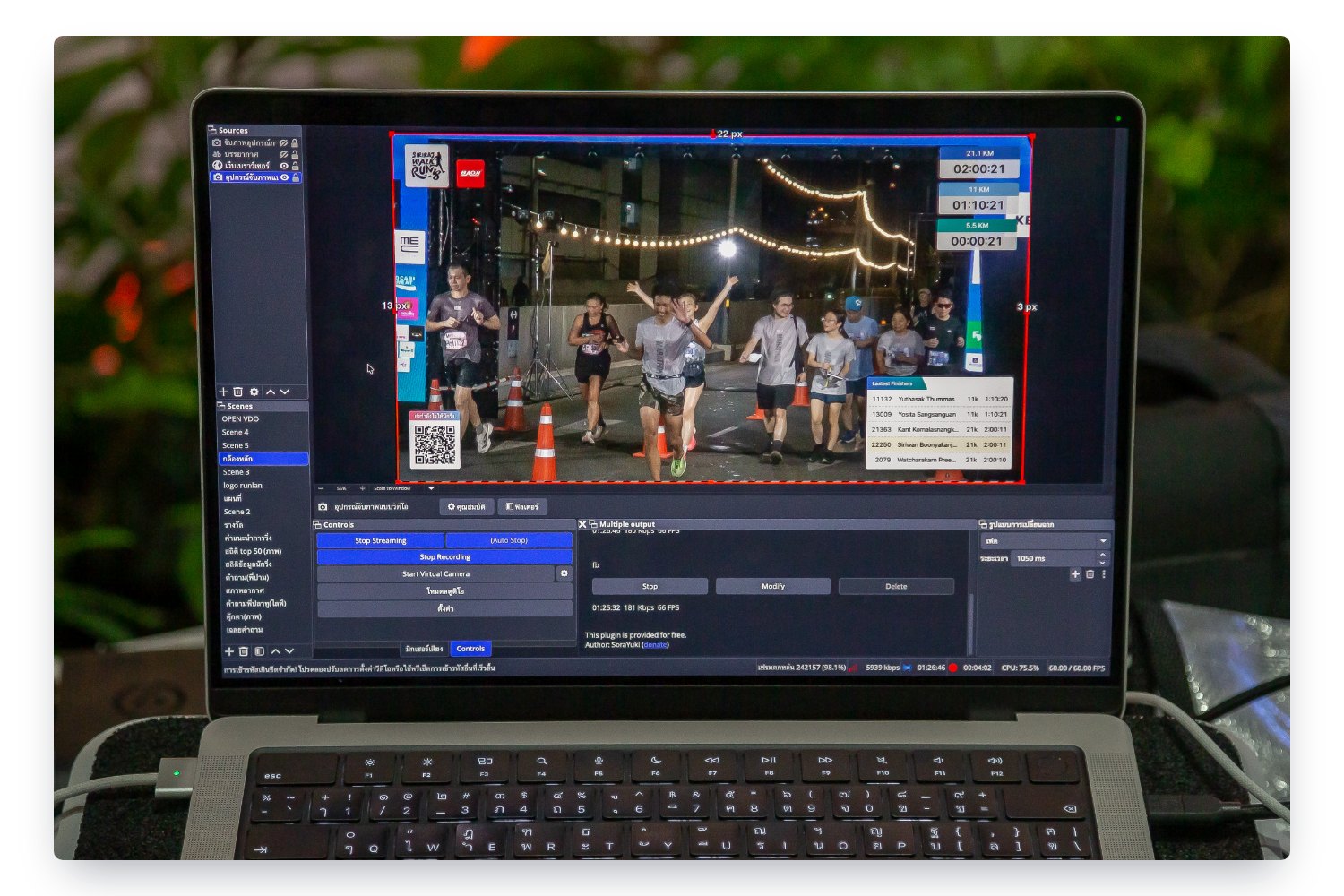
Live display for TV / OBS
Venue screens and streams that update themselves from real timing data
Results on the venue screens and the stream change every minute, faster than anyone can type. So the moment the crowd is largest is often when the screen is stuck on the previous category, or on the event logo all morning.
Stream viewers see runners passing a camera with no idea who they are or where they are placed. And for sponsors who paid to be seen, a frozen screen or a stream with no logos is something sold but not delivered.
The RunLah team designs the screens around your event’s brand, and they update themselves within seconds from the times actually recorded, both at the venue and as an overlay on the stream your own team runs. Nobody has to type.
What this service does for you
- 1
Agree before the event what each screen is for
The RunLah team designs the screens around your event’s brand: colours, logos, where sponsors sit and what information is shown. You see the real thing and can ask for changes before race day, so it is not something you configure yourself or see for the first time when the screen is switched on at the venue.
- 2
Connect a screen and open a link
It works with any screen driven by a computer, an Android box or a smart TV that can open a browser. Open that screen’s link and it is running — nothing to install, no specialist hardware, and nobody needed to watch it.
- 3
Your stream team adds the link as a source
If the event already streams, the team adds the same link to the live production software they already use and gets a results overlay with a transparent background sitting on the real video. Whichever channel you stream to works exactly as before — only now viewers have the information to follow the race.
- 4
It updates itself while people are still running
Each time a runner passes a timing point, the relevant screens update within seconds with nobody pressing anything: latest finishers, category placings, a race clock running from the actual start time, and where on the course the field is currently bunched.
- 5
Screens change with the phase of the day
Before the start, during the race and at the prize ceremony need different things on screen, so the changeover can be scheduled in advance and switched during the day without walking round stopping each machine. A screen that loses its connection reconnects itself and picks up the current state.
How organizers use it
A results screen worth standing in front of
Finishers appear one at a time with their time and category placing, so people waiting for a friend at the finish always have something to follow — and a runner who has just finished sees their own name on screen seconds later, which plenty of them photograph and post themselves without being asked.
A stream with real data, without hiring a graphics team
Results bars, race clock, finisher names and sponsor logos are laid over the live video and update continuously. Your existing stream team does not change how they work and nobody has to type numbers in, and viewers who previously saw only runners passing a camera can tell they are watching a race.
Sponsor space you can actually point at
Sponsor logos are on the venue screens and in the stream all day, either fixed in a row, scrolling as a bar, or rotating one at a time so every sponsor gets equal full-size exposure. That gives you something concrete to sell in a package, and images afterwards showing where the logos appeared.
A course map showing where the field is now
The screen shows the route with the density of runners on it, plus how many have started, how many are still out and how many have finished. The MC has something to talk about while waiting for the main group, your crew can see which point to prepare next, and viewers at home get an overview a single camera cannot give.
The same screens on collection day and at chip check
On bib collection day the screen shows live collection totals, and at the chip check point it shows the name, distance and age group of whoever just tapped, for the runner to verify. It is one system managed from one place, so you are not assembling equipment from several suppliers for different days.
Messages from home on the venue screens
People who could not come can leave a message for a runner through the event’s link, and it appears on the venue screens and in the stream. Supporters at home become part of the day, and it gives people a reason to share the event without you buying more advertising.
Nobody has to babysit a screen
Screens change content on the schedule you set, reconnect themselves when the signal stutters and pull the current state back without anyone refreshing. Staff who used to be stationed at a screen can go and do something that genuinely needs a person.
Frequently asked questions
What equipment do we need?
A screen, and anything that can open a browser with an internet connection — a computer, an Android box or a smart TV. Nothing to install and no specialist hardware. Whatever screens you hire, landscape and portrait both work, and 4K is supported. If the venue’s connectivity is unreliable, our team can place a machine on site that serves the display locally.
Does it work with events streaming to Facebook, YouTube or TikTok?
All of them, because what we hand over is a link that renders with a transparent background. Your stream team adds it as one source in the live production software they already use, and the stream goes out exactly as before. We are not involved with your page or channel and nothing about the way your team streams has to change.
What if the event has no stream team?
The venue TV screens work on their own with no stream team involved. If you want to start streaming yourselves, whoever takes it on needs one computer with any of the freely available streaming applications; we send the overlay link and how to connect it. The filming and the streaming itself remain with your team.
How far behind real time is what appears on screen?
A few seconds from a runner passing a timing point, because the screens do not wait for a refresh cycle and nobody presses update. What can lag further is the live video itself, which depends on the latency of the platform you stream to rather than on the numbers in the results bar.
Can we change what a screen shows during the event?
Yes — which screen shows what, and the sponsor logos or their order, can all be changed during the day. Screens that are already running pick up the new content themselves, with nobody walking over to them.
What if the venue internet drops during the event?
The screen keeps trying to reconnect and, once it does, picks up the current state immediately without anyone restarting it. Timing does not stop when a screen does: times recorded while it was dark are still captured in full and appear as soon as the connection returns.
How many screens should we have, and where?
There is no limit, and each screen can show a different layout and different distances, or several distances together. The most valuable position is past the finish, where people gather waiting for friends, followed by the results area and bib collection. Most events start with two or three and add more the following year — and our team is happy to look at your site plan and suggest positions.
Can events timed by another provider use these screens?
Not currently. Every display reads directly from RunLah’s timing and on-site systems, which is exactly why it updates itself with nobody entering data. Events using our timing service get these screens straight away, with nothing extra to connect.
Related services
RFID timing
RFID chip timing at every point from start to finish, run end to end by RunLah’s own timing crew. Results appear the moment a runner crosses the line, finish-line video is there to re-check a close call, and every recorded time has a per-read record you can open when someone asks.
Results & rankings
Results appear the moment a runner crosses the line, with splits and category rankings across every distance, plus an individual result page that can be shared and looked up long afterwards.
Cheer messages
Supporters send messages of encouragement from their phones; each one is screened at the level your event chooses, then appears on the venue screens within seconds — and anything can be pulled off the screen instantly at any time.