Cheer messages
Let the people at home be part of the day too
On race day, the people not running are the biggest group at the event: family, friends and everyone at home. They all want to take part, and all they can do is wait and press like.
Many organizers would like messages on the screen, but stop at one question: what happens when someone sends abuse, an advert or an attack in the middle of the event? With sponsors and press on site, that is not a risk you can take, and on race day nobody is free to read every message all day.
Supporters send messages from their own phones, and you choose the screening level, from approving every message to automatic screening with nobody watching. Any message can be pulled off the screen at any time.
What this service does for you
- 1
Supporters open it on their own phone
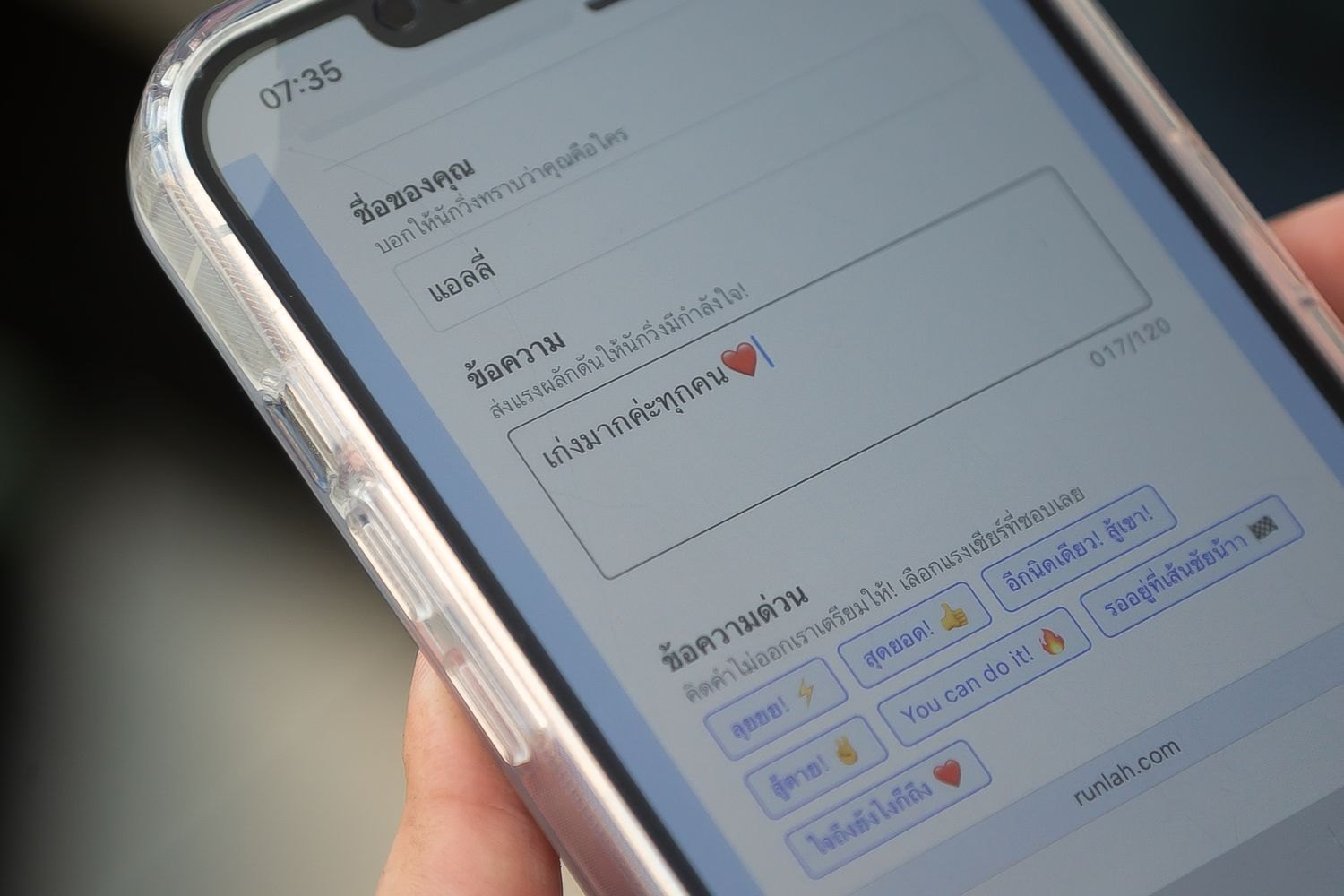
At the venue they scan the QR on the screen; people at home open the link you post on your page. The send page opens straight in a browser — no app to install, no account to create — so someone cheering once actually goes through with it instead of giving up at a sign-up form.
- 2
Choose who to cheer, then write the message
Cheer a specific runner by searching a bib number or a name, pick several in one message for a group who came together, or cheer everyone at the event for people who do not know the bib number. For anyone stuck for words, there are ready-made messages in Thai and English.
- 3
Filtered at the level your event chooses
Three levels: straight to the screen, automatic screening within seconds, or every message approved by a moderator first. The default is the safest of the three, and the level can be changed during the event if it turns out to be too strict or too loose.
- 4
On the venue screens for everyone to see
Messages that pass appear within seconds, newest at the top, with the sender’s name and the runner being cheered, then rotate so the screen never sits still. Events with several screens can choose which one shows messages for which distance.
- 5
Under control all day
One management page holds every message, searchable and filterable by status or distance. Anything already on screen that turns out to be unsuitable is pulled down immediately, and anything worth showing again can be put back up.
How organizers use it
People who could not come are still part of it
Parents in another province, a friend who could not get away, a parent whose child is too young for a start before dawn — they can send a message from home and it appears on the venue screen exactly like one sent from the finish area. Most races have no way to give that group any part in the day.
Runners see their own name on the big screen
Messages naming a runner and bib number put their name up in large type with the encouragement that was sent. It is a moment plenty of people photograph without being asked — and the event name is in every one of those photos.
A screen with something new on it constantly
A screen showing only a results table is interesting when runners are finishing. A steady flow of cheer messages keeps it moving all day, so people stand and watch for longer — which is the same thing that makes the sponsor logos on that screen actually get seen.
Something to promote before race day
The send link can be opened before the event, so you can invite people at home to leave a message for a runner today. It is content that draws engagement from people who never entered the race — a group ordinary posts rarely reach.
Risk you can dial up or down
A small event where the supporters all know each other can let messages go straight up. An event with sponsors and press on site can require moderator approval for every message, and the level can be changed mid-event if the situation does. You are not forced to choose between wide open and not at all.
No extra people on the day
Automatic screening does the job of a person reading every message all day. Anything rejected gets an immediate reply to the sender explaining why, so they can rewrite and send again themselves. Your crew only checks in periodically instead of watching a queue.
The messages outlast the day
Every message is kept for you to look back at — how many came in and what people wrote to the runners. It is material for a thank-you post afterwards, and a number worth taking to sponsors next year.
Frequently asked questions
Do we need screens at the venue?
Yes, because the messages appear on the event’s live displays — the same screens showing results and winners. If your event does not have them yet, both need to be enabled together. Events with a stream team can also have the messages appear on the overlay above the live video.
Do senders need an app or an account?
Neither. It opens in a phone browser via the QR on the screen or a link you share. Adding a sender name is optional; without one, the message appears from an anonymous sender.
How are unsuitable messages controlled?
Three levels. The first puts messages up unfiltered. The second screens them automatically, catching profanity, personal attacks, advertising and political or religious content, and replies to the sender with the reason so they can rewrite and send again. The third has a moderator approve each message before it appears. Every event starts on the third, the safest one. Whichever level you use, anything already on screen can be pulled down at any time.
What if the automatic screening rejects a perfectly reasonable message?
Rejected messages are not lost — they are kept with the reason and shown to moderators on the management page, who can approve them onto the screen if there is nothing wrong. It also lets you judge whether the screening is too strict and adjust the level accordingly.
Does someone have to sit approving messages all day?
Only on the moderator level, where messages stay in the queue until someone approves them. The other two levels need nobody watching, which is why most events choose automatic screening and have their crew check in from time to time.
How long can a message be, and how often can someone send?
Up to 120 characters, emoji included, with a sender name up to 30 characters, and up to 20 runners named in one message. Sending is limited to once every ten seconds and ten times per five minutes. The length limit exists because messages have to be readable from several metres away on a screen split into panels — any longer and the type becomes too small to read.
What if the sender does not know the runner’s bib number?
They can search by name and pick from the bib numbers shown, or cheer everyone at the event instead — those messages appear without a named recipient, which suits people cheering the race as a whole rather than one person.
If a runner never walks past a screen, do they get the message?
No. This does not send anything to the runner — there is no SMS and no notification. Messages appear on the venue screens only, so anyone not passing a screen while theirs is up will not see it. The most effective placement is therefore a screen in an area where people already stop, such as past the finish or the results zone.
If a lot of people send at once, do all the messages get shown?
The screen shows several at a time and rotates new ones in continuously. When messages arrive faster than the rotation, they queue and appear in order, so nothing is lost — though nothing stays up permanently either, as new messages replace old ones once the panels are full.
Can events timed by another provider use this?
Not currently, because these screens read runner data and results from RunLah’s system, and cheering a specific bib requires the entrant data to be in that same system.
Related services
Live display for TV / OBS
Live results, placings, latest finishers and sponsor logos appear on screen straight from the times being recorded — as TV screens around the venue, and as a transparent overlay your own stream team can drop over their live video.
Results & rankings
Results appear the moment a runner crosses the line, with splits and category rankings across every distance, plus an individual result page that can be shared and looked up long afterwards.