
Result slips
Runners leave with their result in hand
The moment runners most want their result is the minute they cross the line, yet all they carry away from there is a medal and a bottle of water.
So the questions gather at the crew table just when finishers are thickest. Runners with a dead battery or no phone can’t check the website, and a screenshot of a results table has no event name, so nobody seeing the post knows which race it was.
A slip printing point past the finish answers those questions before runners reach the table. Separately, every event timed with RunLah already includes a downloadable slip with the event name and logo for runners to post themselves.
What this service does for you
- 1
Finish, then pick up a slip on the way through
The printing point sits past the finish, in the area runners already walk through. They tap their own bib number on the on-screen keypad, or give it to a staff member, and the slip prints in a few seconds — with no queue to ask anyone anything.
- 2
One slip with the whole result on it
Bib number, name, national flag, club, distance and category, total time in large type, chip time, the time at every point with the pace for that section, and any prize won alongside the placing against the field in that category. Printed in Thai or English, switchable slip by slip for international runners.
- 3
A QR at the bottom leads to the full result
Every slip carries a QR to that bib’s result page online. A runner who wants the latest placing, a comparison with friends, or to download a certificate scans it straight off the paper in their hand — no bib number to retype and no link to hunt for.
- 4
Anyone who missed the point can download later
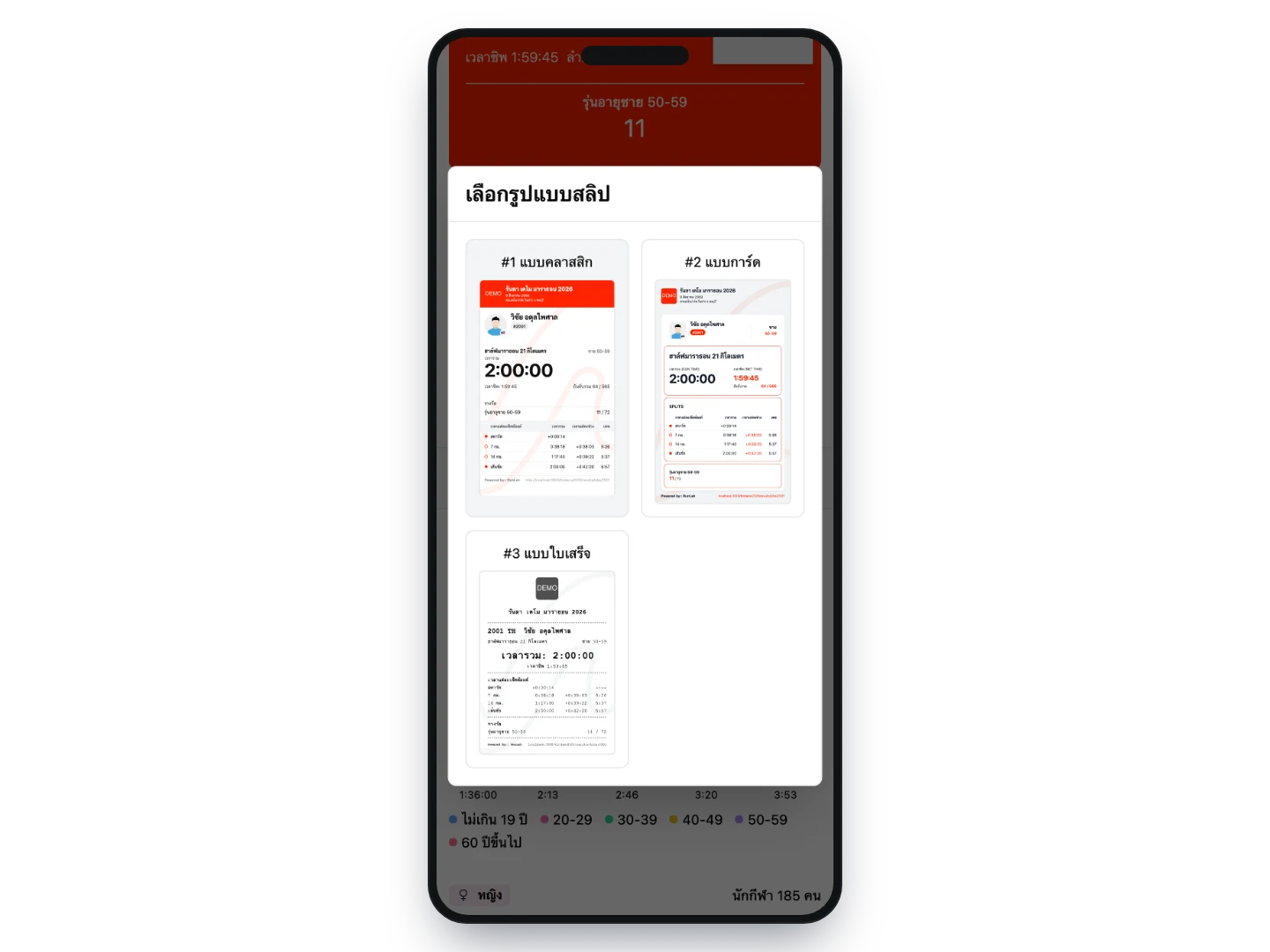
Every finisher can download their own slip from their result page at any time. The slip shows the pace of every split, and from the previews on screen the runner can pick a Story image or a post image with their result instead. It is an image saved straight to the device, with no login and no expiry.
- 5
And then runners post it themselves
The downloaded slip is an image ready to post, carrying the event name, logo, date and their result together. Anyone seeing the post knows immediately which race it was — unlike a screenshot of a results table, which says nothing about the event at all.
How organizers use it
A keepsake handed over when it means the most
A piece of paper with their name, time and placing, given to them in the minute they finish, is something plenty of runners photograph and actually keep — unlike a result on a screen that scrolls past. Most events still have nothing like it to give.
The queue of result questions disappears
Nearly every question at the crew table after the finish is what was my time and where did I place, and the slip answers both before anyone walks over. Your crew gets that period back for the things that genuinely need people, at the busiest hour of the day.
Event media that runners publish for you
Every slip carries the event name and logo, so the posts runners make themselves carry the race to people who were not there. It costs the event nothing and scales with how proud people are of their result.
International runners get their result in a language they read
Slips print in English one at a time without reconfiguring the point, so events with overseas entrants do not need someone translating results at the desk — and that group is among the most likely to post their result.
Nobody misses out for not walking past the point
The downloadable version covers every finisher, whether they left early, never saw the service point, or only thought of it once they got home. You do not have to size the printing points for the entire field.
Wrong results get caught while everyone is still on site
A slip puts the result in a runner’s hands on paper before they leave, so anything that looks off — a missing split, the wrong category — is raised with your crew there and then, with the evidence in hand, instead of turning up as a comment after results are announced.
A giveaway with nothing to order in advance and nothing left over
Unlike medals or shirts, which have to be estimated months ahead and usually leave stock behind, slips are printed only for the people who come and collect one. The cost per slip is paper, and another printing point can be added if the queue turns out longer than expected.
What you can set
- Number of printing points
- As many as the event needs, all printing at once, each with its own printer
- How each point is run
- Self-service, where runners key in their own bib number, or staffed, where crew do it — set independently per point
- Slip language
- Thai or English, with a default per point and switchable slip by slip when printing
- The download version
- Included on every event timed by RunLah, with designs the runner previews and picks on screen and nothing to enable
Frequently asked questions
Do we need both the printed slips and the downloadable ones?
No. The slip runners download from their result page comes with every event we time, at no extra cost and with nothing to switch on. The on-site printing point is the part that needs equipment, staff and floor space, so it is discussed event by event.
What does a printing point need?
A network-capable thermal receipt printer, one Android tablet or phone per point, the venue network, power, and a table people can walk up to. The RunLah team connects the devices to the results system before the event starts, so all that is left on the day is keying in a bib number.
If the venue internet goes down, can we still print?
Yes. The printing point reads results from a server on site over the local network rather than over the internet, so as long as the venue network is up, printing continues as normal.
Can runners who did not finish or were disqualified print a slip?
Yes. It prints the times that were recorded with the status noted on the slip — did not finish, or a rule infringement. Runners can see for themselves what the system holds, which heads off more disputes afterwards than withholding the slip would.
Can a lost slip be reprinted?
As many times as needed — keying the same bib number produces a new one, and staffed points keep a list of recent prints so a reprint takes one tap.
How long does a printed slip last?
Thermal paper fades over time and with heat, like any receipt, so the printed slip is best thought of as something received on the day. What lasts is the downloadable version on the runner’s own result page, which stays online and can be downloaded again at any point.
Do runners have to log in to download a slip?
No. The per-bib result page is public: tap the download button, pick a design from the previews on screen, and the file saves to the device — on a phone or a computer.
Does the system post it to social media?
It does not. The system creates the image; the runner decides where to post it or who to send it to. That is precisely why every design carries the event name and logo — the only way the event benefits is if the slip is worth posting to the runner in the first place.
How far can we brand the slips?
Printed slips are black and white with the event logo at the top; the downloadable version uses the event’s colours and logo as well. What is not possible yet is placing separate sponsor logos on the slip, so events wanting sponsor space in the finish area usually pair this with the live displays.
Can events timed by another provider use this?
Not currently, because both halves read directly from RunLah’s timing system — splits, placings and prizes — so the results have to be in the same system.
Related services
Results & rankings
Results appear the moment a runner crosses the line, with splits and category rankings across every distance, plus an individual result page that can be shared and looked up long afterwards.
e-Certificate
Certificates are generated automatically after the race and downloaded by runners themselves — nothing to print, nothing to distribute — and runners tend to share them for you.