Chip check
Let runners see their own details on screen, while it can still be fixed
Runners have no way of knowing whether the bib in their hand is linked to their correct name, distance and age group until the results come out, and by then it is hard to fix.
A misspelled name, a date of birth that lands someone in the wrong age group, or the wrong bib handed over: all of these are common. A chip that will not read cannot be seen at all; you find out when the runner finishes and no time appears. Caught at the results announcement, it means correcting results after the fact, and an age-group prize may already have gone to the wrong person on stage.
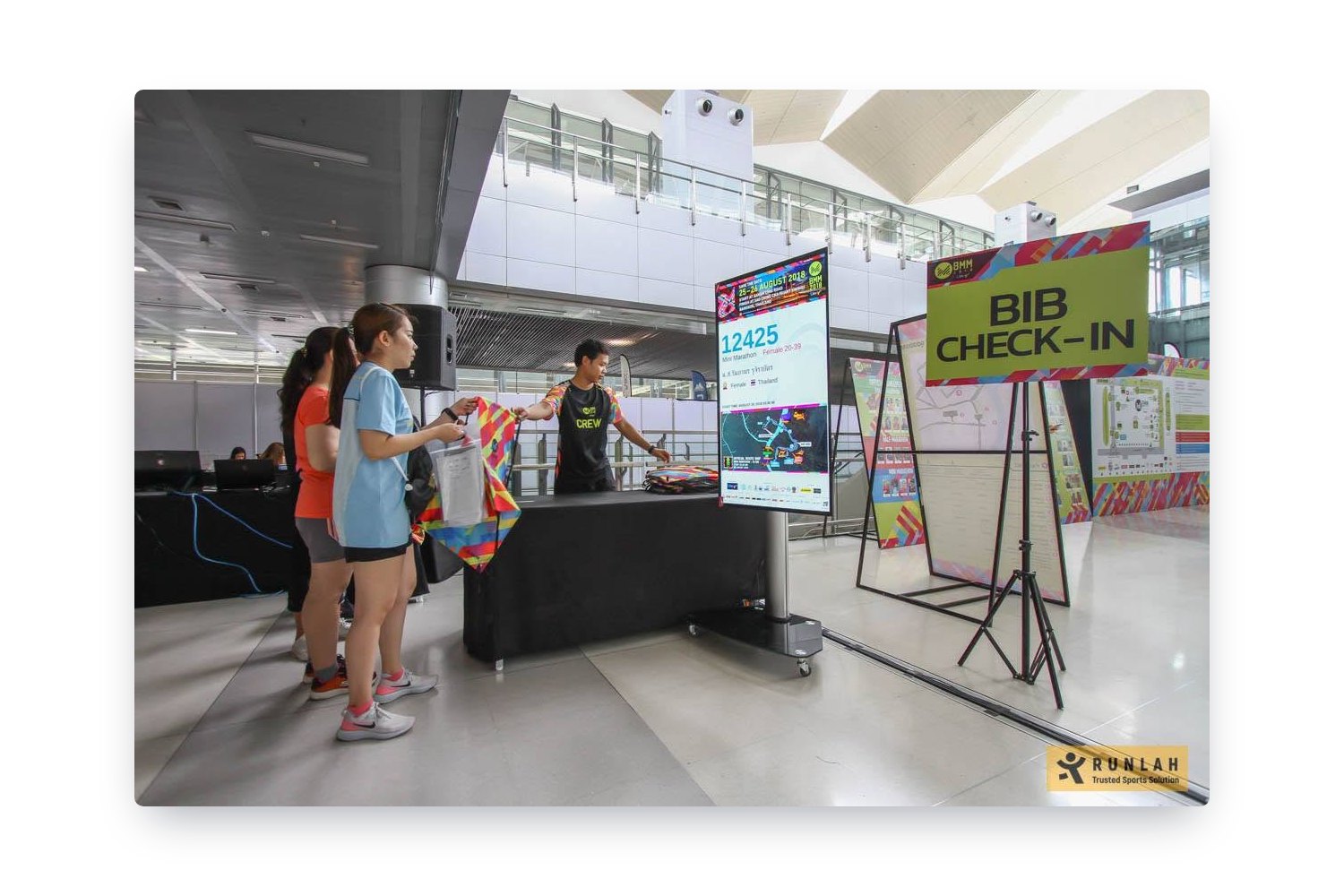
The easiest moment to fix it is collection day. Chip check shows runners their own details on a big screen, staff correct anything wrong on the spot, and every bib tapped has its chip tested along the way.
What this service does for you
- 1
Tap the bib at the chip check point
After collecting their shirt and pack, the runner comes to the chip check point and taps the bib on the reader so the system reads the chip on the back. If nothing reads, you know right there that this bib has a problem and needs replacing before race day — and the bib number can always be typed in instead.
- 2
The details fill a large screen for the runner to read
The bib number in large type, name, photo, national flag, distance entered, age group and the start time for that group appear immediately, so runners read it from where they stand and staff are not squinting at a small screen and reciting it to each person.
- 3
If something is wrong, it is fixed there
A misspelled name, the wrong age group, or the wrong bib handed over at the collection desk — the crew corrects it in the on-site system straight away, then asks the runner to tap again to confirm. Nothing is written on paper to be dealt with later.
- 4
The screen is never blank
Between taps it returns to the event logo, name, date, time and venue, along with a sponsor logo bar and a count of how many runners have been checked out of the total — then switches back to runner details the moment someone taps.
- 5
You know who has arrived
The first tap for each runner is timestamped, so you can see both the total and the individuals who have arrived, without counting the queue at the desk. For events collecting over several days, the count can be reset for the whole event.
How organizers use it
Every bib can be checked, even when the runner is not there
What this point verifies is attached to the bib, not to the person in front of you — name, distance, age group and whether the chip reads. So somebody collecting for a whole group can tap every bib in one go, and wrong details or a dead chip are found while everything is still at the venue.
Dead chips found on collection day
A chip that will not read is invisible from the outside. Without this point you learn about it when the runner finishes and no time appears — difficult to recover from and usually the start of a complaint. Having everyone tap once before race day is, in effect, testing every chip.
The wrong age group is the wrong prize winner
A date of birth out by one year moves someone into another group, and it surfaces when the name is called for a trophy. A screen showing the age group in large type puts the check in the hands of the person who knows best which group they belong in.
Names spelled correctly on results and certificates from the start
One missing letter follows the runner onto the results page, the certificate and the result slip they share. Fixing it here takes seconds; fixing it after the event means correcting each place in turn and reissuing documents.
A screen runners want a photo with
A display with their own name and bib number filling it is already something people photograph for social media. Events that design the screen well and place it where someone can stand in front of it get posts from runners without asking — with the event name in every shot.
Sponsor space that people actually look at
The sponsor bar is on screen both when idle and when showing details, at a point everyone has to walk up to anyway. Unlike a vinyl banner, it can rotate sponsors on a timer — and it ends up in the photos runners take themselves.
Count who has arrived
The first tap for each runner is recorded, so through the day you can judge how many have arrived and how many are still to come — a real number to make staffing decisions from, rather than a sense of whether the queue looks long.
Frequently asked questions
How is this different from the pack collection desk?
Different jobs, and they belong on separate tables. Collection is about handing the right pack to the right person; chip check is about verifying that the details attached to that bib are correct. Runners pass through collection first and come here after, which keeps the queues apart — so anyone needing a correction does not hold up the whole collection line.
Can events without chip timing use this?
Yes, since details can be pulled up by bib number as well. But it pays off most at timed events, because the same tap confirms that the chip in the bib really does read — something almost impossible to verify any other way.
What do we need, and can we use a screen we already hired?
You can. What is needed is a screen with HDMI, one machine that can open a browser, a chip reader and a network at the venue; the display opens from a single link with no login. A portrait screen works best, as the bib number and name get the full width, but landscape is fine — and larger events can run several screens at once, each named separately, choosing which one to show on.
What can the screen show?
Bib number, first and last name in Thai and English, the runner’s photo, national flag and country, club, distance, category and age group, start time, the number of competitors in the same distance and group, and the route map — with each item switchable. Team entries show the team name with every member on one bib. Details stay up for around ten seconds (adjustable) before returning to the idle screen.
Can we design the screen ourselves?
The RunLah team lays it out before the event. Send your event logo, colours, fonts, background image and sponsor logos, and review a preview before approving. Multiple sponsors can sit together in a bar or rotate on a timer, and the layout can differ per distance. We do the layout because this screen has to be readable from several metres away and is only up for a dozen seconds per runner, so the arrangement matters far more in the field than it appears to on a desktop.
Does the point need to be staffed?
At least one person, yes — the real value here is "found and fixed immediately". With nobody there to make corrections, it is only a screen telling runners something is wrong, and they have to join another queue anyway.
Is what appears on screen personal data?
It shows what a runner needs in order to identify themselves, and each item can be switched off. Events that would rather not display photos or club names can turn those off. What is always shown — bib number, distance and category — is the same information already published on the results page.
What if one person collects for a whole group and hands the bibs out later?
It helps as far as the bibs are still at the venue: whoever collects can tap every one of them, and wrong names, groups, distances and unreadable chips all surface there. Once the bibs leave, who ends up pinning on which bib is beyond what the system can follow. Events concerned about this often run a second chip check point on race morning, so anyone who got their bib from a friend can confirm it themselves before heading to the start.
Where should the point be placed?
Just past the exit of pack collection, so runners pass it without doubling back, with space in front of the screen to stand for photos without blocking the flow. Next to a sponsor zone is better still, since this point already makes people stop and stand.
Related services
Race pack collection
A pack collection system refined across more than 200 live events. Runners can be through the desk in as little as 15 seconds, using fewer lanes, fewer staff and less space — and it keeps working when the venue’s internet drops.
RFID timing
RFID chip timing at every point from start to finish, run end to end by RunLah’s own timing crew. Results appear the moment a runner crosses the line, finish-line video is there to re-check a close call, and every recorded time has a per-read record you can open when someone asks.